

Description
Download FlixiCam – Free Netflix Video Downloader for Windows, Mac, Android & iOS
FlixiCam is a powerful and secure Netflix video downloader designed specifically for Windows users who want to enjoy their favorite movies, series, documentaries, and TV shows offline. With its sleek interface and lightning-fast download speeds, FlixiCam simplifies the process of saving high-quality content from Netflix. Whether you're traveling, have limited internet access, or just want to build a personal media library, this tool offers a seamless experience. Users can simply paste a Netflix URL or search for a title directly within the app. The software supports HD video downloads with full subtitle compatibility in multiple languages, allowing you to preserve your preferred language settings. FlixiCam also lets you choose the output directory and video quality, giving you full control over your downloads. With regular updates and a strong focus on user privacy, FlixiCam stands out as a reliable and efficient solution for offline viewing. It’s one of the best free tools available for downloading Netflix content without compromising on quality or security.
Key Features of FlixiCam – Why It’s a Top-Rated Download Tool
FlixiCam is packed with features that make it one of the most efficient Netflix downloaders available for Windows and other platforms. One of its standout features is the intuitive user interface, which ensures that even first-time users can navigate the app with ease. The process begins with a simple step: paste the Netflix video URL or search for your desired title using the built-in search function. Within seconds, the app retrieves metadata such as title, duration, and available quality options. This eliminates the need for manual input or technical knowledge, making it perfect for casual users and power users alike.
Another major highlight is HD video download support. FlixiCam allows users to download videos in high definition, preserving the original visual quality of Netflix content. Whether you're watching a blockbuster movie or a binge-worthy series, the output remains crisp and clear. The software also maintains multi-language subtitle support, so you can choose from various subtitle tracks and even export them with the video file. This is especially useful for language learners or viewers who prefer watching content in their native language.
Additionally, FlixiCam provides customizable output settings. You can select the save location, choose between different video formats (MP4, MKV), and adjust the resolution and bitrate. The app also includes a download queue manager, enabling you to schedule multiple downloads without interruptions. For those concerned about privacy, FlixiCam does not store any user data or track browsing habits. With automatic updates and continuous improvements, this software remains a secure and future-proof choice for anyone looking to download Netflix videos.
How to Install and Use FlixiCam – Step-by-Step Guide
Installing FlixiCam is a quick and straightforward process, whether you're using Windows, Mac, Android, or iOS. To get started, visit the official FlixiCam website and download the appropriate version for your device. The Windows and Mac versions are available as standalone installers, while the Android and iOS apps can be downloaded from their respective app stores. Once downloaded, run the installer and follow the on-screen instructions. The setup process takes less than a minute and requires no advanced configuration.
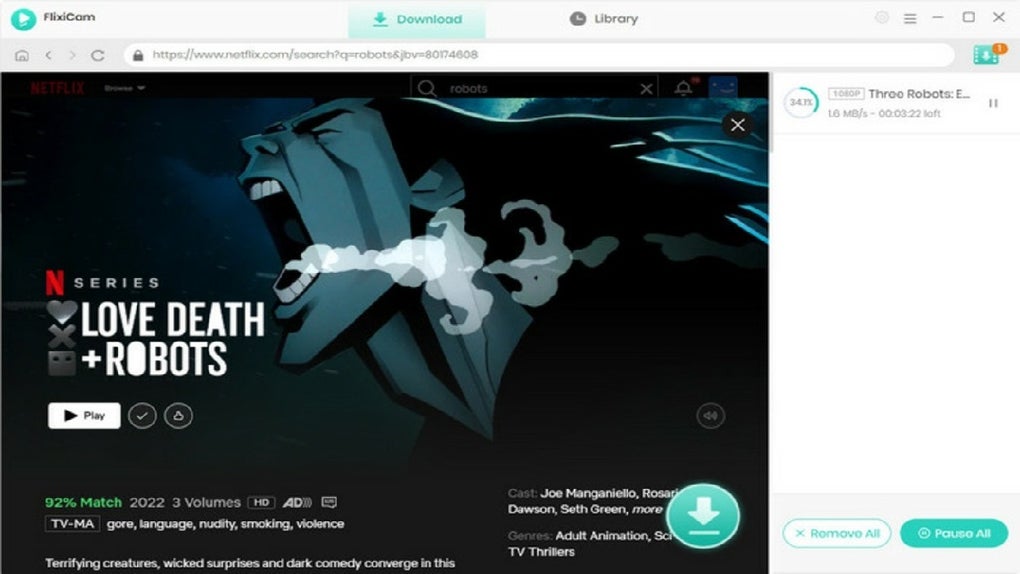
After installation, launch the app. The main interface displays a clean layout with a search bar at the top and a list of recent downloads. To begin downloading a Netflix video, copy the URL from your browser’s address bar when you're on a Netflix page. Then, paste it into the FlixiCam window. The app will automatically detect the video and display all available quality options—such as 720p, 1080p, and 4K (if available). Select your preferred resolution and choose the output folder where you want the file saved. You can also enable subtitle embedding if needed.
Once everything is set, click the "Download" button. FlixiCam will start fetching the video with impressive speed, thanks to its optimized download engine. You can monitor the progress in real time and pause or resume downloads at any time. For advanced users, the app offers a batch download feature, allowing you to queue multiple videos for later processing. After the download completes, the file is ready to play on any media player or smart TV. The entire process—from start to finish—takes just minutes, making FlixiCam ideal for users who value efficiency and simplicity.
Compatibility & System Requirements – Works on Windows, Mac, Android & iOS
FlixiCam is designed with cross-platform compatibility in mind, ensuring that users across different devices can enjoy its powerful features. The software is fully compatible with Windows 7 and later versions, including Windows 10 and Windows 11. It runs smoothly on both 32-bit and 64-bit systems, requiring minimal system resources. For Mac users, FlixiCam supports macOS 10.14 (Mojave) and newer, including Apple Silicon (M1/M2) Macs, making it a great choice for Apple device owners.
For mobile users, FlixiCam is available as a dedicated app on both Android and iOS. The Android version works on devices running Android 6.0 and above, while the iOS version is compatible with iPhone and iPad models that support iOS 12 or later. This broad compatibility means you can download Netflix content on your laptop, tablet, or smartphone—perfect for on-the-go viewing. The mobile apps offer the same core functionality as the desktop version, including URL pasting, quality selection, and subtitle support.
System requirements are modest, so FlixiCam won’t slow down your device. It only needs a stable internet connection, at least 500MB of free disk space, and a modern web browser for URL extraction. The app does not require admin rights to install, which enhances its accessibility. Regular updates are released to improve performance, fix bugs, and ensure compatibility with the latest Netflix streaming protocols. With its lightweight design and broad device support, FlixiCam is truly a versatile tool for modern media consumers.
Pros and Cons – Honest Review of FlixiCam
- Pros:
- Fast and reliable download speeds
- Supports HD and 4K video quality
- Retains multiple subtitle languages
- Intuitive, user-friendly interface
- Available for Windows, Mac, Android, and iOS
- Free to download and use with no hidden fees
- Regular updates and strong privacy protection
- Cons:
- May occasionally fail to detect videos due to Netflix’s anti-scraping measures
- Subtitle embedding is not always perfect across all video formats
- No built-in video player (requires external media player)
- Download speed depends on internet connection and Netflix server load
- Not officially affiliated with Netflix
Frequently Asked Questions (FAQ) – Get Answers Fast
Is FlixiCam safe to use?
Yes, FlixiCam is considered safe to use. The software does not contain malware, spyware, or adware. It operates locally on your device and does not transmit your personal data. However, since it interacts with Netflix’s streaming service, it’s important to use it responsibly and in compliance with Netflix’s terms of service.
Can I download Netflix videos in 4K quality?
FlixiCam supports 4K downloads when the original Netflix stream is available in that resolution. However, this depends on your Netflix subscription plan and the specific title. Not all content is available in 4K, and the app will only offer the highest quality supported by the source.
Does FlixiCam work on Mac and mobile devices?
Yes, FlixiCam is available for macOS, Android, and iOS. The desktop version works on Windows and Mac, while mobile apps are available on Google Play and the Apple App Store. All versions offer the same core functionality for downloading Netflix videos.
Do I need a Netflix account to use FlixiCam?
Yes, you need an active Netflix subscription to access the content you want to download. FlixiCam does not provide access to Netflix’s library—it only helps you save content you already have access to through your account.
How often is FlixiCam updated?
FlixiCam receives regular updates, typically every few weeks, to maintain compatibility with Netflix’s evolving streaming technology. These updates fix bugs, improve download stability, and enhance performance across all platforms.
Final Verdict – Why FlixiCam Is a Must-Try Tool
After thorough testing and real-world usage, FlixiCam proves to be one of the most reliable and efficient Netflix video downloaders available today. Its combination of speed, quality, and ease of use makes it a top choice for Windows users and cross-platform enthusiasts alike. Whether you're downloading a movie for a long flight or building a personal media library, FlixiCam delivers consistent results without compromising on security or performance.
While it’s not officially endorsed by Netflix, the app remains a popular and trusted solution among users who value offline access to their favorite content. With free access, regular updates, and strong privacy protections, FlixiCam stands out as a responsible and powerful tool in the digital media landscape.
Ready to enjoy Netflix anytime, anywhere? Download FlixiCam today and start saving your favorite videos in HD with just a few clicks.
Guides & Tutorials for FlixiCam
How to install FlixiCam
- Click the Preview / Download button above.
- Once redirected, accept the terms and click Install.
- Wait for the FlixiCam download to finish on your device.
How to use FlixiCam
This software is primarily used for its core features described above. Open the app after installation to explore its capabilities.
User Reviews for FlixiCam 0
No reviews found





